From Stuck to Spark: How the Power Platform Changed My Entire Career


The excitement and opportunity you feel right out of college are unmatched– the world feels wide open. But if you're like me and earned a degree in business, that wide-open feeling can quickly turn into overwhelm. With so many possible paths, how do you even begin to narrow them down? I felt completely stuck.
Fast-forward a few years– I landed a role as a Change Management consultant. In that role, I learned that change management is more than just training and communications. It's about truly understanding everyone impacted by the change, providing them opportunities to share their concerns, and giving them space to practice. Little did I know that the skills I was building would lead to something I never expected.
As a consultant, you're encouraged to dedicate time to professional development and this can look different for everyone. I'd always been interest in technology. In fact, I almost pursued a degree in computer science. I admired the people who could write out code from scratch and transform it into applications an entire organization relied on. I aspired to be like them, but at the time, I just wanted to strengthen my Excel skills.
As part of my professional development, I focused on learning more about Power Query and Excel. After completing a few LinkedIn Learning courses, I stumbled upon one about Power Automate. Intrigued by the title, I clicked 'Begin'.
My eyes were opened!
I was amazed that, even without any coding experience, I could build a flow that automated an entire process. I was convinced that I was the last to know Power Automate even existed. I had to learn more. I watched more videos and something amazing happened. I started seeing inefficiencies as an opportunity to solve with Power Automate.
Whenever I encountered a recurring task, I automated it. And whenever a need arose to streamline a process, I saw it as an opportunity to build a solution. As I continued learning more about Power Automate, my interest naturally expanded to other Power Platform tools– and that's when I discovered Power Apps. Following the same approach of identifying a business problem and designing a solution, I built a Canvas App that our entire practice now relies on for client delivery.
And it didn't stop there. I built Power BI reports to track how our solutions were being used and created Copilot Studio agents to support our team so they could stay focused on serving our clients.
During this time, I earned both the PL-200 and PL-600 certifications– credentials that deepened my expertise across the Power Platform. I went on to lead practice-wide Copilot training, facilitate hackathons, and advise teams on a wide range of Power Platform projects.
Today, I'm a consultant focused entirely on Power Platform and M365 Copilot projects. If someone had told me right out of college that I'd become a Power Platform Solution Architect, I would have laughed– mostly because I had no idea what any of those meant back then.
Why am I sharing this?
I'm sharing this for anyone who feels stuck in a dead-end job. For those who didn't finish college and think that limits their future. For first-generation professionals who are navigating careers without a roadmap. For anyone who needs to know that their path isn't fixed.
If you're feeling stuck and want to try something new, I genuinely encourage you to give the Power Platform a shot. It might open doors you didn't even know existed.
What is the Power Platform?
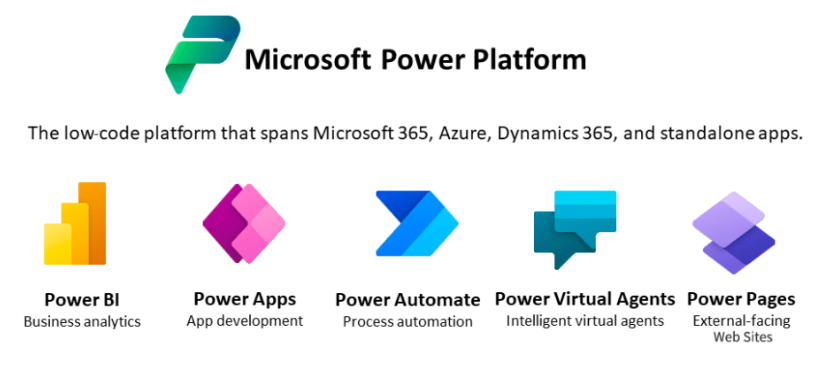
The Power Platform is a suite of Microsoft tools designed to help people analyze data, build custom applications, and automate business workflows. What makes it truly powerful is that it was created for people with little to no coding experience– meaning anyone can learn to use these tools and start solving real problems.
Why learn?
You may not be looking for a career change– and that's completely okay. Learning these tools doesn't mean you have to become a Power Platform Solution Architect like I did; that just happened to be the path I wanted. Think of learning the Power Platform the same way you'd brush up on your Excel skills. In the near future, knowing how to build a simple workflow in Power Automate may be just as expected as knowing how to use XLOOKUP or pivot tables. So why not give yourself a head start now?
How can I learn?
There are many different ways to start learning the Power Platform– and the best part is that you can focus on the tool that matters most to you. If you want to prioritize Power BI, go for it. If you want to build automations or learn Copilot Studio, you can start there. Here are some great places to begin:
- Power Up Program: The Power Up program is a free, Microsoft-sponsored program designed to teach you how to use the Power Platform, including how to build agents in Copilot Studio. This program is comprised of modules, exercises, and a course challenge. Upon completion, you'll earn a Credly badge.
- Microsoft Learn: There are several courses available and "App in a day" courses available through Microsoft Learn. These are great if you prefer to read through material as opposed to solely watching videos. Upon completion, you can earn trophies, skills, or certifications.
- Copilot Studio Academy: Similar to the Power Up Program, the Copilot Studio Academy focuses on how to build effective agents in Copilot Studio. While the Power Up Program does a great job in providing you the basics, the Copilot Studio Academy helps you advance from beginner to intermediate/advanced with practical guidance.
- YouTube: There's incredible content from Microsoft MVPs and community experts. Many of them offer full overview videos or cover targeted topics. I highly recommend you check out PowerApps911 or PragmaticWorks.
In addition to these resources, I highly recommend plugging into the community. Microsoft offers weekly Power Platform community calls where the product teams share the latest updates and community members showcase the solutions they've built. These calls are a fantastic way to stay current, discover new ideas, and learn directly from people who are building every day.
You'll quickly see that the Power Platform community is incredibly welcoming and supportive– everyone genuinely wants to see you succeed!
I used all of these resources to deepen my understanding of the Power Platform, but what helped me the most was diving in. When I started, I wasn't trying to solve big or complex problems– I started small. My very first Power Automate flow did nothing more than save a photo of an expense receipt into a specific folder in my OneDrive. And honestly, I didn't even build it from scratch– I used a template.
But that tiny win changed everything. Seeing something I built actually work gave me the confidence to try more, build more, and eventually move on to flows that weren't based on templates at all.
Today's goal? Start small.
Thank you for reading!
Please share your thoughts in the comments—what would you like me to cover next?
-The Autonomous Edge